- Shell 100%
|
|
||
|---|---|---|
| LICENSE | ||
| README.md | ||
| scrotselect | ||
| scrotshot | ||
| scrotshot.desktop | ||

ScrotShot
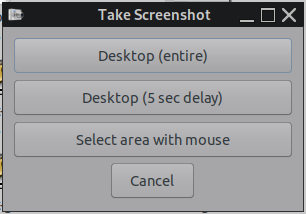
A simple GUI utility to take screenshots using scrot for the backend and yad for dialogs.
Offering the following screenshot options:
- The entire desktop
- The entire desktop with a 5 second delay
- Select area using the mouse (click and hold+move to draw) or Select window (click and release on the target window)
The app will also open a view of the shot you just took in a simple undecorated window with a close button. When run normally from a menu entry, screenshots by default will go into the users home directory.
Deb package : https://sourceforge.net/projects/vuu-do/files/Miscellaneous/apps/ScrotShot/
Depends: scrot, yad
Note:
When selecting the third option, if you have conky running the script will turn it off before
it takes the shot, then turn it back on again afterwards. In some cases when conky updates while
you are drawing the selection, it will create artifacts in the shot. So I made the scrotselect
script to overcome this.