- C 87.1%
- Shell 12.9%
|
|
||
|---|---|---|
| .asoundrc | ||
| .gitignore | ||
| alsatoggle.c | ||
| alsatune-wrapper | ||
| alsatune.c | ||
| alsatune.desktop | ||
| LICENSE | ||
| preset-edit | ||
| presets.csv | ||
| README.md | ||
| soundswitch | ||
| test.wav | ||

AlsaTune
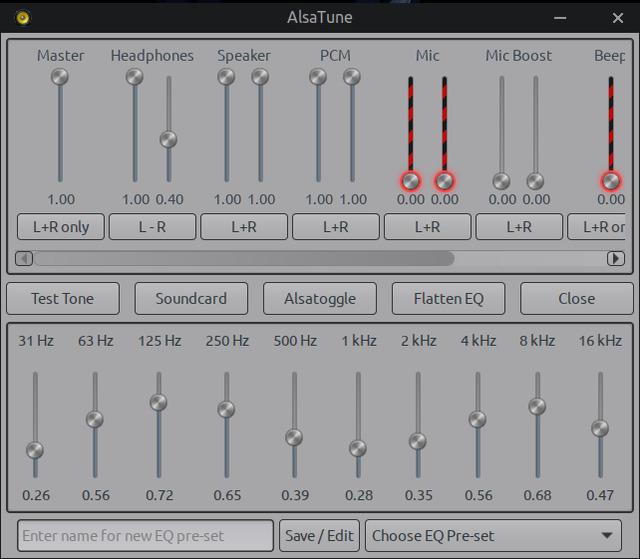
A simple GUI to control ALSA mixer and equalizer on pure ALSA-only systems.
AlsaTune provides an easy-to-use graphical interface for adjusting sound levels, managing the ALSA equalizer, saving and loading custom EQ presets, and toggling hardware controls — all without PulseAudio, PipeWire, or other sound servers.
Note: This application is designed exclusively for systems running pure ALSA. It will not function correctly if PulseAudio, PipeWire, or similar sound servers are active.
Features
- Real-time ALSA mixer control with volume sliders
- Full ALSA equalizer support with user-defined presets
- Save, load, edit, and apply EQ presets instantly (even while media is playing)
- Dual left/right balance sliders for supported channels
- Mute/unmute support (right-click sliders that support it)
- Sound card switcher with automatic
.asoundrchandling - Test tone generator
- Flatten EQ button (resets all bands to 50%)
- AlsaToggle — separate GUI for on/off hardware switches (Auto-Mute, Loopback, etc.)
- Automatic detection of available mixer channels and scrollable interface
- Clean, lightweight GTK3 interface
Dependencies
Runtime Dependencies
libgtk-3-0
libasound2-plugin-equal
alsa-utils
yad
Build Dependencies
libgtk-3-dev
libasound2-dev
build-essential
pkg-config
Building from Source
alsatune (main GUI)
gcc -o alsatune alsatune.c $(pkg-config --cflags --libs gtk+-3.0 alsa glib-2.0) -Wall
alsatoggle (for pure toggles on the backend)
gcc alsatoggle.c -o alsatoggle $(pkg-config --cflags --libs gtk+-3.0) -lasound
Downloads
Deb packages: https://sourceforge.net/projects/vuu-do/files/Miscellaneous/apps/AlsaTune/
Usage
- Make sure your system is configured for pure ALSA (no PulseAudio/PipeWire running).
- Launch
alsatune. - The app will automatically read current mixer and EQ settings.
- Adjust volumes and EQ bands with sliders.
- Save Preset: Set EQ > enter name > click Save/Edit.
- Load Preset: Choose from the dropdown menu (applies instantly).
- Edit Presets: Right-click Save/Edit button.
- Mute: Right-click supported volume sliders.
- Balance: Use the link/unlink button under dual sliders.
- AlsaToggle: Click the AlsaToggle button for additional hardware switches.
Presets are stored in: ~/.local/share/alsatune/presets.csv
Important Notes
- Works best on laptops and simple desktop setups. Complex multi-card systems may require manual
.asoundrctuning. - Built and tested on Daedalus/Bookworm (GCC 12) and Excalibur/Trixie (GCC 14). Minor compiler warnings may appear on newer GCC until rebuilt.
Sample ~/.asoundrc
The following working sample .asoundrc is included in /usr/share/alsatune/,
for most single-card systems, it works really well:
# Vuu-do default .asoundrc
# Default: route through dmix > plug > equalizer > hardware

pcm.!default {
    type plug
    slave.pcm "dmixed_equal"
}

ctl.!default {
    type hw
    card 0
}

# Equalizer control (for AlsaTune GUI)
ctl.equal {
    type equal
}

# Final EQ stage: applies to mixed output
pcm.dmixed_equal {
    type equal
    slave.pcm "dmixed_plug"
}

# Plug wrapper for format/rate conversion after dmix
pcm.dmixed_plug {
    type plug
    slave.pcm "dmixed"
}

# dmix: allows multiple playback streams > direct to hardware
pcm.dmixed {
    type dmix
    ipc_key 1024
    ipc_key_add_uid false   # safer than 0
    slave {
        pcm "hw:0,0"
        period_time 0
        period_size 1024
        buffer_size 4096
        rate 44100          # optional: lock rate if needed
    }
    bindings {
        0 0
        1 1
    }
}

# Optional: dsnoop for multiple capture (mic) apps
pcm.dsnooped {
    type dsnoop
    ipc_key 1025
    slave.pcm "hw:0,0"
}

# Optional: full duplex (for simultaneous play+capture)
pcm.duplex {
    type asym
    playback.pcm "dmixed_plug"
    capture.pcm "dsnooped"
}
Disclaimer
This is free software with NO WARRANTY. Use at your own risk.
Made for the ALSA purist. Enjoy!