- C 84.3%
- Shell 15.7%
| LICENSE | ||
| README.md | ||
| vsmp.c | ||
| vsmp.desktop | ||
| vsmpp.c | ||
| vsmpr | ||
| vsmpr-add | ||
| vsmps | ||
| vsr | ||

VSMP
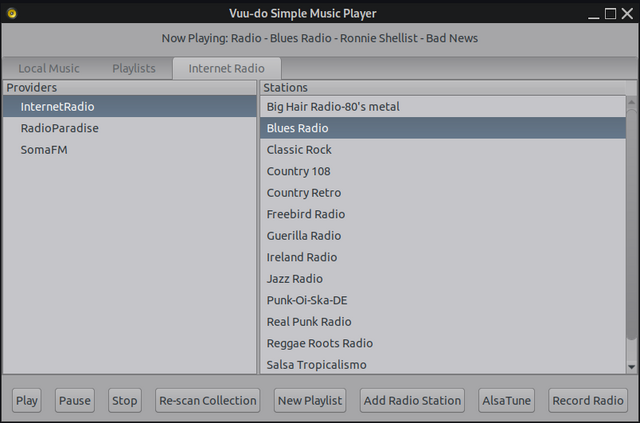
Vuu-do Simple Music Player, no frills, no features, plain interface. Just music.
- Builds a local music database from ~/Music and a radio database automatically on first run.
- Re-scan function for adding new local music.
- Simple dialog to add new radio stations to the database.
- Supports mp3, ogg, and flac for local playback.
- Supports mp3 and aac radio streams.
- Create and save playlists with a drag-and-drop interface.
- Record internet radio streams, with options to split and name tracks or save as a single file.
- Integrates with AlsaTune for real-time audio tweaks (if installed).
Pre-built .deb packages : https://sourceforge.net/projects/vuu-do/files/Miscellaneous/apps/VSMP/
Runtime:
Depends: libgtk-3-0, libcurl4, libjson-glib-1.0-0, ffmpeg, yad, streamripper, bash
Recommends: alsatune
VSMP is made to be brute simple, there is no replay-gain or re-sampling done by the player, just pure unfiltered music. Controls are easy, this is a set-and-forget type of app for those who just want to start the music, minimize the player and get on with other tasks. There is no provision to right-click a music file in your file manager and open it in this app, playing a single song is already an option in the context menu in Vuu-do so no need. It also currently does not support playing music directly from a CD in your optical drive, that would be less-simple, but may be a future option, for now I recommend Asunder for ripping CD's to your HD/SSD and adding to your collection.
To play music, first select station/album/playlist in the treeview, then select the track to start with in the main pane and then hit "play". The "Pause" button toggles pause on/off.
To add a new playlist just click that button and a drag-n-drop window opens on top of other windows, so you can add songs from your file-manager or from the main pane of the player itself, note that when adding from the player's main pane you can only grab one song at a time, but in your file manager you can select multiple songs and drag them all at once. Note that you can't grab a whole folder and drag/drop it, only songs at this time. To delete playlists no longer wanted, open your file-manager to ~/.local/share/vsmp/playlists and delete the ones you don't want.
Adding a radio station is easy, just click that button and fill in the form that pops up. The first field "Provider" can be anything you choose, and is intended for things like "SomaFM" and "Radio Paradise" that provide multiple stations, if in doubt just throw up something like "Internet Radio". The station name is the next field, this also can be anything you like, the name of the station or a descriptive title like "Blues Radio".
The last field must be precise, the URL of the stream itself. There are various ways to find this, most stations have online players you can start that open a new window, and frequently the URL of that window is the stream URL you need. A nice website that hunts those pesky url's for you: https://streamurl.link/ To delete stations, open ~/.local/share/vsmp/vsmp_radio_db in your text-editor and delete the ones you don't want. Be careful to maintain the format!
The Record Radio button does just that, you must have a station streaming to activate this function, once started it forks off as a separate process with it's own window, recording the station you selected until you tell it to stop. So you can listen to other music in the player or turn it off entirely and the record function will continue to run. It uses Streamripper for the backend and will store new tracks in your ~/Music directory. After recording new tracks, just hit the "Re-scan Collection" button to add them to the VSMP database.
Currently this is an alpha version, might be quirks, please let me know if you have any issues!
~greenjeans